 ️
️ EQUEL (Database Functions)
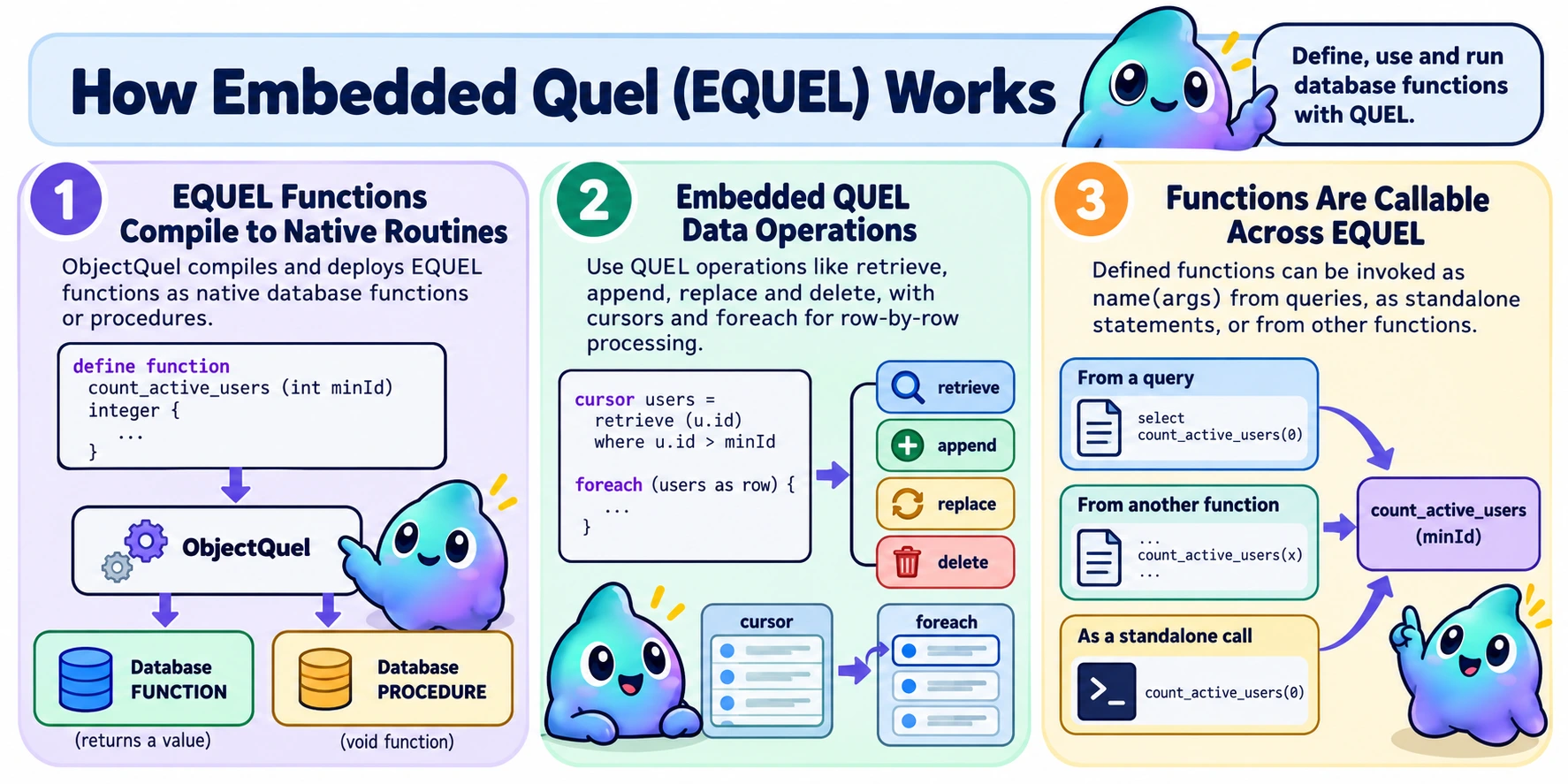
Embedded Quel (EQUEL) lets you define functions in QUEL and call them from queries, from other functions, or on their own as name(args). ObjectQuel compiles and deploys them for your database, so you do not need to write database-specific stored-program syntax.
define function there.
On this page:
A First Function
$entityManager->executeQuery('
    range of u is App\Entity\UserEntity

    define function count_active_users (int minId) integer {
        integer total = 0
        cursor users = retrieve (u.id) where u.id > minId and u.banned = false

        foreach (users as row) {
            total++
        }

        return total
    }
');
Once defined, call the function to get its result:
$result = $entityManager->executeQuery('count_active_users(:minId)', ['minId' => 0]);
$count = $result[0]['count_active_users'];
A function has four parts:
define functionstarts a function definition.name (params)declares the parameters C-style, astype name, separated by commas. Use()for a function with no parameters.- The return type comes after the parameter list with no colon. Use
voidfor a function that returns nothing. - The body sits in
{ }. Statements are separated by line breaks or whitespace, with no semicolons.
The statement syntax borrows from C, Go and PHP:
- As in Go: blocks always need braces, statements need no semicolons, and
++and--are postfix statements. - As in PHP: the condition of
if,elseifandwhilegoes in parentheses, and a chained condition is writtenelseiforelse if. - As in C: declarations put the type first (
integer total = 0), parameters are writtentype name, andbreakandcontinueonly affect the innermost loop, with no labeled or numbered form. - As in SQL:
=compares (instead of==).
What You Can Use
| Define | range of x is Entity define function name (type param, …) returnType { … }destroy function name [if exists] |
|---|---|
| Variables | type name [= expr]name = exprname++, name += expr, name *= expr |
| Loops | cursor c = retrieve (…) where …foreach (c as row) { … } |
| Branching | if (cond) { … } elseif (cond) { … } else { … }while (cond) { … }break, continuereturn expr, or a bare return in a void function |
| Data | retrieve, append, replace, delete, as in ordinary queries |
| Atomic | atomic { … }rollback |
| Calling | name(args) as a statementname(args) in an expression |
Creating and Removing Functions
define function creates a new function:
$entityManager->executeQuery('
    define function double_it (integer n) integer {
        return n * 2
    }
');
define function never replaces one. If the name is already in use, ObjectQuel reports an error and leaves the existing function unchanged. Different parameters or a different return type do not free the name. Remove a function explicitly with destroy function:
$entityManager->executeQuery('destroy function count_active_users');           // error if it doesn't exist
$entityManager->executeQuery('destroy function count_active_users if exists'); // no error if it doesn't exist
To change a function, run destroy function name if exists before the new define function. These are separate operations: if creation fails after removal, the old function is gone.
Function Return Types
A function's return type determines whether it yields a value and where you can call it:
| Return type | Result | How to use it |
|---|---|---|
A column type (integer, string, …) | Returns a value | In an expression, or as a statement to get its value |
void | Returns no value | As a statement: name(args) |
When deploying a function, ObjectQuel creates a native database FUNCTION for a value-returning function or a native PROCEDURE for a void function.
$entityManager->executeQuery('
    range of u is App\Entity\UserEntity

    define function rename_user (integer uid, string who) void {
        replace u (username = who) where u.id = uid
    }
');
A function can't be named after a built-in function such as count or concat. It could never be called, because the built-in would always take precedence. For the same reason it can't be named after a statement word: the function-body words listed under Scope, or create, alter, destroy, hide, show, index, define, retrieve and append.
Types, Variables and Scope
This section covers a function body's types, how to declare and assign a local, scope rules for locals and cursors, the type checks ObjectQuel applies at compile time, and the shorthand operators for common numeric assignments.
Declaring Variables
integer processed = 0
string label
label = "pending"
Types
Parameters and locals use the column types from create, such as integer, string, boolean, float, decimal and datetime. int is accepted as a shorthand for integer. Type names are case-insensitive. Two more type names exist only in functions: void, which is only allowed as a return type, and cursor, which is only allowed as a local's type (see Cursors and foreach) and can't be a parameter or a return type.
Type Checking
ObjectQuel checks types when it compiles the function. It compares type categories: numeric, string, boolean, datetime and array (json, set).
- Return values, assignments and initial values must match the declared type's category.
integerandfloatcan be mixed. ifandwhileconditions must be boolean. An integer doesn't count as true or false.- A comparison that reads a function variable or cursor field can't mix categories. Values written to a column must match the column's type.
- Arithmetic (
+,-,*,/) that reads a function variable or cursor field can't have a string operand. The engines disagree on what+does to a string, so useconcat()to join strings. - A value whose type can't be worked out, such as
NULLor the result of another function, is accepted.
Increment and Compound Assignment
Six shorthands add to or subtract from a numeric variable. Each one is exactly the assignment next to it:
| Shorthand | Same as |
|---|---|
total++ |
total = total + 1 |
total-- |
total = total - 1 |
total += expr |
total = total + (expr) |
total -= expr |
total = total - (expr) |
total *= expr |
total = total * (expr) |
total /= expr |
total = total / (expr) |
- Statements only. They can't be used inside an expression, so
x = total++,return total--andwhile (i++ < 10)are errors. Put the increment on a line of its own. - No internal spaces, written tight against the variable.
total ++,++totalandtotal + = 1are all errors. Because++/--are operators, touching signs also read as one:a--bis an error rather thana - (-b)— writea - -bwith a space (this applies to ordinary queries too, not just function bodies). - Numeric only. The variable must be a numeric type (see Type Checking above); on a string it's a type error.
- Division follows the engine.
/=divides the way the database does: PostgreSQL and SQL Server truncate integer division (7 / 2is3), while MySQL and MariaDB return a decimal, rounded when it's stored in anintegervariable.
Scope
- Ranges are declared ahead of
define function, not inside its body.range of x is Entitysits before the function, the same way it sits before an ordinaryretrieveorreplace— ranges are the entities a function touches, closer to an import than to a scratch variable, so they're known before the body runs rather than scattered through it. Writingrange ofinside{ }is a syntax error. - Locals and cursors follow block scope. Nested declarations may shadow an enclosing local, cursor or parameter. Redeclaring a name in the same block or shadowing a
range ofalias is an error. - Declare before use. Using a name above its declaration is an error.
- Statement words are reserved.
if,else,elseif,while,foreach,return,atomic,rollback,break,continue,replace,delete,retrieveandappendcan't be used as names. - No
:nameplaceholders. A function gets its input values through its parameters. - Names must differ by more than case, across the whole function. Two parameters, locals or cursors whose names differ only in case (
totalandTotal) are rejected, even in different blocks — the underlying database engines can't always tell them apart. So are two fields of one cursor that differ only in case. - No clashes with columns. If a bare name in an embedded query could mean either a function variable or an unqualified property of a declared range, ObjectQuel reports an error. It won't guess which one you meant. Qualify the column (
u.id) or rename the variable.
Cursors and foreach
To loop over rows, bind a retrieve to a cursor local, then loop over that local with foreach (cursor as row). row is bound to the current row for the loop's body; the cursor's own name never refers to a row, only to the query it holds. Each entry in the target list becomes a field of that row, read as row.field. An aliased entry uses its alias (name = u.username gives row.name). An unaliased entry uses the bare property name (u.id gives row.id).
$entityManager->executeQuery('
    range of u is App\Entity\UserEntity

    define function count_named_users (int minId) int {
        int total = 0
        cursor users = retrieve (u.id, name = u.username) where u.id > minId

        foreach (users as row) {
            if (row.name != "") {
                total++
            }
        }

        return total
    }
');- A cursor needs a
retrieve. A cursor must be declared with= retrieve (...). It can be assigned again later, but only to anotherretrieve— never to an ordinary value. - A cursor is block-scoped, like a local (see Types, Variables and Scope) — a nested cursor can shadow an outer one, and separate branches can reuse a name.
- The query runs when the loop starts. A cursor's query uses its variables' values at the moment
foreachbegins. Later changes to those variables inside the loop don't affect it. - Zero rows means zero iterations. No row-count check is added for you. To read one value, assign it inside the loop. If the query matches more than one row, the last assignment wins.
- A cursor can be looped more than once. Each
foreachruns the query again from the start. You can nest aforeachover one cursor inside a loop over another cursor. You can't nest a loop over a cursor inside a loop over the same cursor. - A row binding can't use a parameter, local, range or cursor name visible at that point. Nested loops may reuse the same row binding name: inside the inner loop it reads the inner cursor's row, and after that loop it reads the outer cursor's row again. Separate loops may also reuse a row binding name.
- Only values in the target list. A function
retrievecan't select a whole entity (retrieve (u)). - Windowed results. A function
retrievesupportswindow page, size. Usesort byfor stable pages; SQL Server requires it. sort bysets the loop order. It works as in any other query.- A
retrievedoesn't need a cursor. One that isn't bound to a cursor is allowed; it just runs and its result is thrown away.
Writing Inside a Loop
Inside foreach, replace and delete are the same statements you use anywhere else: they target a declared range, and need an explicit where. To act on the row you just fetched, reference the row binding's own field in that where, exactly like any other function variable:
$entityManager->executeQuery('
    range of u is App\Entity\UserEntity

    define function ban_user (string who) void {
        cursor users = retrieve (u.id, u.username) where u.username = who

        foreach (users as row) {
            replace u (banned = true) where u.id = row.id
        }
    }
');
Control Flow
if/elseif/else and while work the way they do in most C-like languages. The condition always sits in one pair of parentheses, and any number of elseif branches can follow an if before an optional closing else, with the first true branch running and the rest skipped:
if (total > 100) {
    label = "large"
} elseif (total > 10) {
    label = "medium"
} else {
    label = "small"
}

while (processed > 1000) {
    processed -= 1000
}- The condition goes in one pair of parentheses:
if (a > 1 or b) {.if a > 1 {andif (a > 1) or (b) {are errors.elseifandelse ifmean the same thing, and both can be used in one chain. - A value-returning function must reach a
returnon every path — loops never count as always returning, so put areturnafter the loop. Avoidfunction can instead use a barereturn, with no value, as an early exit; that's a compile error in a value-returning function. - You can
returnfrom inside a loop. The loop's open cursors are closed first.
$entityManager->executeQuery('
    range of u is App\Entity\UserEntity

	define function ban_user_if_valid (integer targetId) void {
        if (targetId <= 0) {
            return
        }

        replace u (banned = true) where u.id = targetId
    }
');
break and continue
break and continue behave as they do in most languages — continue skips to the next iteration, break leaves the loop entirely — with a couple of rules that follow from how cursors and atomic blocks work:
- Both are only valid inside a
whileorforeach, and always act on the innermost one;breakout of aforeachalso closes its cursor, as if the last row had been read. - If an
atomicblock is inside a loop,breakandcontinuein the block can't target that outer loop, since that would skip the block's cleanup — loops inside the block can still use both normally.
foreach (users as row) {
    if (row.banned = true) {
        continue
    }

    if (total >= limit) {
        break
    }

    total++
}
Writing Data
append, replace and delete work in functions the same way they do elsewhere. The upsert form is included (see Upsert). As usual, append needs a declared range as its target, and replace/delete on a range need a where:
$entityManager->executeQuery('
    range of u is App\Entity\UserEntity
    define function sync_user (integer userId, string newEmail) void {
        append to u (id = userId, email = newEmail) or replace (email = newEmail) where u.id = userId
    }
');
A few write forms are rejected because they need PHP-side work that can't happen inside the database:
- An
appendwhose primary key is generated in PHP. - An upsert that needs a PHP-side fallback
UPDATE. - A statement that would need a bound parameter, such as a UUID
@Orm\Versioncolumn.
Atomic Blocks
atomic { } treats its statements as one unit: reaching } keeps their changes, while rollback rolls back changes made in the block and continues after it. For example:
$entityManager->executeQuery('
    range of u is App\Entity\UserEntity

    define function change_email (integer userId, string newEmail) void {
        atomic {
            replace u (email = newEmail) where u.id = userId

            if (newEmail = "") {
                rollback
            }
        }
    }
');
$entityManager->executeQuery('change_email(:userId, :newEmail)', [
'userId' => 42,
'newEmail' => 'new@example.com',
]);For a standalone call like this one, ObjectQuel commits a successful call automatically. An empty newEmail triggers rollback and leaves the existing email unchanged; otherwise the new email is saved when executeQuery() returns.
Rules that ObjectQuel checks when it compiles the function:
rollbackis only valid insideatomic. It must be the last statement on its path through the block.if (…) { rollback } else { … }is fine, but a statement afterrollbackin the same branch is not.rollbackcan't be inside a loop, because later iterations would run after the rollback.- Atomic blocks can't be nested or contain
return. - Atomic blocks are supported only in
voidfunctions. - On MySQL, MariaDB and SQL Server, an atomic block cannot sit inside a
foreach. PostgreSQL has no such restriction.
If your application opened a transaction before the call, a successful block remains part of that transaction. The application can later commit or roll it back.
Calling Functions
From a query
Any name(args) that isn't a built-in function is treated as a function call. You can use calls in the target list, in where, and in replace/append values:
$results = $entityManager->executeQuery('
    range of u is App\Entity\UserEntity
    retrieve (u.id, doubled = double_it(u.id)) where double_it(u.id) > 10
');
Before a query runs, ObjectQuel looks up each function it calls in the database catalog and reads the function's return type. The call is then treated like a column of that type: a datetime function gives a \DateTime, a boolean function gives true or false, and NULL stays null. Writes follow the same rules as for a column: an integer function written to a datetime column is read as a Unix timestamp. The database checks the number and types of the arguments.
- A return type ObjectQuel doesn't create, such as PostgreSQL's
money, isn't converted. The same goes for PostgreSQL overloads that return different types. Add a cast such as(int)when you need a specific PHP type (see Type Casting). - An
enumreturn value stays a string, because the catalog doesn't say which PHP enum it belongs to. - A
voidfunction returns no value, so calling it inside a query is an error.
cont(u.id)) isn't caught when ObjectQuel parses the query. The catalog lookup reports that no matching function exists before the query runs.
As a statement
A statement that is only name(args) runs a function without a query around it:
// void function: runs its database procedure and returns null
$entityManager->executeQuery('rename_user(:id, :name)', ['id' => 42, 'name' => 'alice']);

// Value-returning function: returns a one-row result keyed by its name
$result = $entityManager->executeQuery('count_active_users(:minId + 1)', ['minId' => 0]);
$count = $result[0]['count_active_users'];
From another function
Inside a function body, use a value-returning function in an expression, such as total = count_active_users(0). Call a void function as a statement; its arguments can be expressions:
$entityManager->executeQuery('
    range of u is App\Entity\UserEntity

    define function rename_all (integer uid) void {
        cursor users = retrieve (u.id, name = add_suffix(u.username)) where u.id = uid
        foreach (users as row) {
            rename_user(row.id, row.name)
        }
    }
');
Engine Notes
| Engine | Notes |
|---|---|
| MySQL / MariaDB |
|
| SQL Server |
|
| PostgreSQL |
|
| SQLite |
|
Technical Details
- Variable renaming for reused names. Generated SQL gives each local and cursor declaration a unique name. When a nested block shadows an outer name, a later block reuses one, or a cursor is assigned a new query, ObjectQuel renames the new declaration behind the scenes (
x, thenx_2, …). This is invisible in EQUEL source and error messages — each name is its own SQL cursor or variable.
Summary
- Define:
define function name (type param, …) returnType { … }. Usevoidfor a function that returns no value. - Locals and cursors:
type name [= expr]andcursor c = retrieve (…) where …, block-scoped with nested shadowing — declare either anywhere in the body. - Ranges:
range of x is Entity, declared ahead ofdefine function, the same way it's declared ahead of an ordinaryretrieve/replace/delete— not inside the body. - Shorthands:
name++,name--,name += expr,name -= expr,name *= expr,name /= expr. Statements only, for numeric variables. - Loops:
foreach (c as row) { … }over a declared cursor. Read fields asrow.field. Assignc = retrieve (…)again to point it at a new query for what follows. - Writing inside a loop: an ordinary
replace/deletewith an explicitwhere, referencing the row binding's fields like any other variable. - Control flow:
if/elseif/else,while,break/continueandreturn. Avoidfunction may also use a barereturnas an early exit. - Atomic blocks:
atomic { ... }keeps its changes when it completes;rollbackrolls back the block. ObjectQuel manages standalone calls, while an application-owned transaction remains under the application's control. - Calling:
name(args)in queries and expressions, orname(args)as a statement. The value is converted to the function's return type. - Removing:
destroy function name [if exists].