 ️
️ Soft Delete
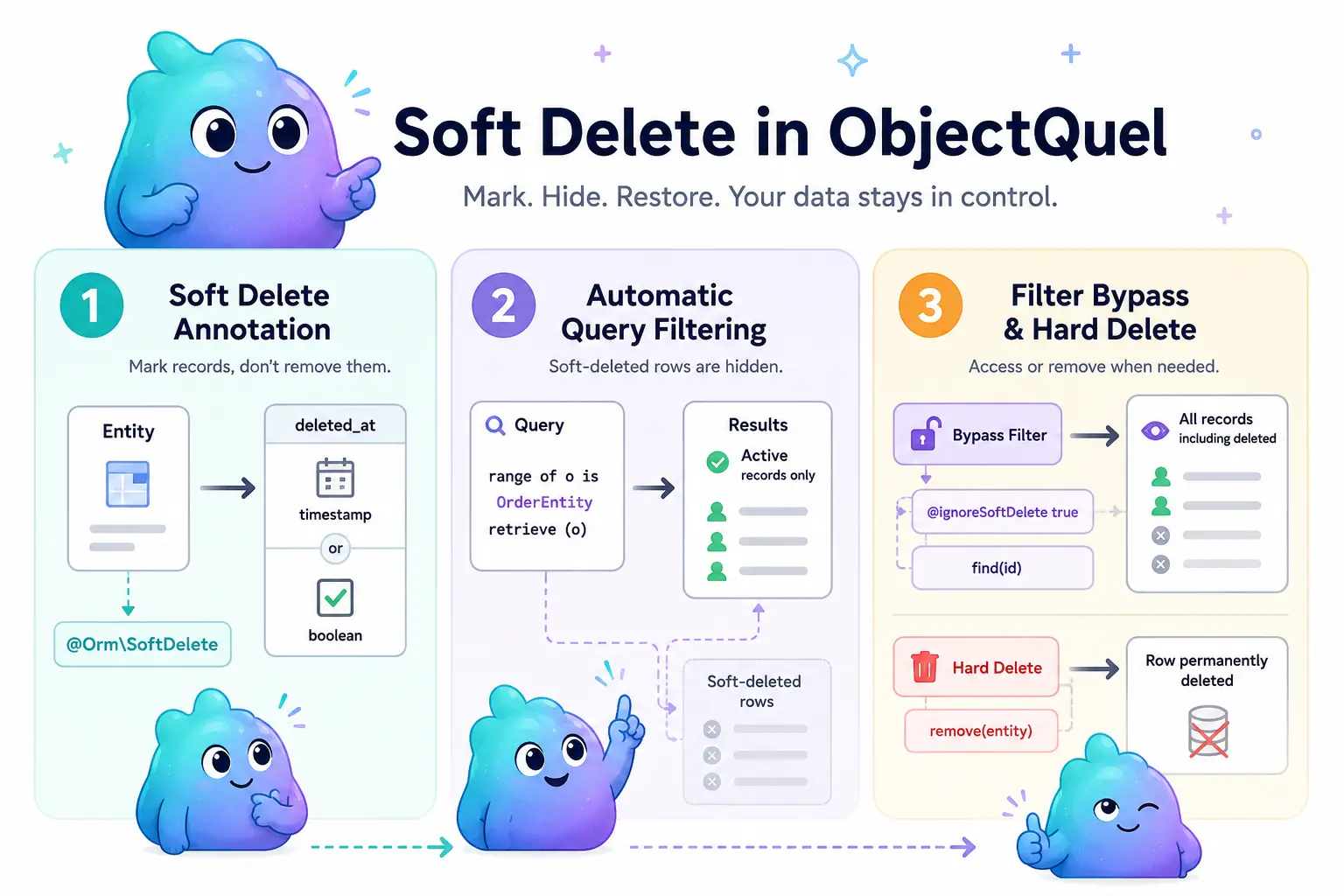
Soft delete lets you mark entities as deleted without removing them from the database. Deleted records are automatically hidden from queries and can be restored at any time. remove() and the delete statement respect @SoftDelete automatically.
What is Soft Delete?
A hard delete removes a row from the database permanently. A soft delete instead sets a column on the row — a timestamp or a boolean — to indicate that the record is no longer active. ObjectQuel filters those rows out of every query automatically, so the rest of your application sees no difference:
// Entity has no @SoftDelete column — always a real DELETE
$entityManager->remove($plainOrder);
$entityManager->flush();

// Entity has @SoftDelete — remove() marks it deleted instead; the row stays
$entityManager->remove($order);
$entityManager->flush();

$order->getDeletedAt(); // now set
When soft delete is useful:
- You need an audit trail of deleted records
- Deletions should be recoverable by an administrator
- Regulatory requirements prohibit permanent data removal
- You want a recycle-bin or undo-delete feature
When a hard delete is better:
- The data is genuinely disposable (e.g. session records, temporary rows)
- Privacy regulations require true erasure (e.g. GDPR right to erasure)
- Table size is a concern and deleted rows should not accumulate
Annotating an Entity
Add a nullable column to your entity and mark it with @Orm\SoftDelete alongside the usual @Orm\Column. The annotation must sit on a column property — it has no effect on its own without a backing column.
ObjectQuel supports two column types for the soft-delete marker:
- datetime —
NULLmeans active; any timestamp means deleted. This is the recommended type because it records when the record was deleted. - boolean —
falsemeans active;truemeans deleted.
use Quellabs\ObjectQuel\Annotations\Orm\Column;
use Quellabs\ObjectQuel\Annotations\Orm\SoftDelete;

class OrderEntity {

    // ... other properties ...

    /**
     * @Orm\Column(name="deleted_at", type="datetime", nullable=true)
     * @Orm\SoftDelete
     */
    protected ?\DateTime $deletedAt = null;

    public function getDeletedAt(): ?\DateTime {
        return $this->deletedAt;
    }

    public function setDeletedAt(?\DateTime $deletedAt): self {
        $this->deletedAt = $deletedAt;
        return $this;
    }
}
Marking as Deleted
The normal way to soft-delete an entity is remove() — the same call you'd already use for a hard delete. ObjectQuel checks the entity's metadata at flush time and marks it deleted instead of removing the row, because it carries @SoftDelete:
$entityManager->remove($order);
$entityManager->flush(); // row stays; deletedAt is set
The QUEL delete statement behaves the same way — see Deleting Data (delete):
$entityManager->executeQuery('
    range of o is App\Entity\OrderEntity
    delete o where o.id = :id
', ['id' => $id]); // row stays; deletedAt is set
You can still set the column directly instead, if you'd rather treat it as a plain property update — both approaches end up doing the same thing:
$order->setDeletedAt(new \DateTime());
$entityManager->flush();
Automatic Filtering
Once an entity has a @SoftDelete annotation, ObjectQuel adds the filter condition to every query for that entity automatically. No changes to your queries are required:
// Returns only active orders — soft-deleted rows are excluded automatically
$orders = $entityManager->executeQuery("
    range of o is App\Entity\OrderEntity
    retrieve (o)
");

// Conditions and joins work the same way
$orders = $entityManager->executeQuery("
    range of o is App\Entity\OrderEntity
    range of c is App\Entity\CustomerEntity via o.customer
    retrieve (o) where c.id = :customerId
", ['customerId' => 42]);where filter: if both OrderEntity and CustomerEntity have @SoftDelete and the join is required — as in the example above, where where c.id = :customerId makes the c join required — the row is excluded when either entity is soft-deleted. For an optional (LEFT JOIN) range, the filter is attached to that range's own join condition instead: a soft-deleted related row is treated the same as no matching row at all, so the parent row still comes back with that range's columns NULL rather than being excluded.
Bypassing the Filter
There are three ways to see soft-deleted records when you need to.
The @ignoreSoftDelete directive disables the filter for a single query. Directive names are case-insensitive, so @ignoreSoftDelete, @IgnoreSoftDelete, and @IGNORESOFTDELETE are all equivalent:
// Returns all orders, including soft-deleted ones
$allOrders = $entityManager->executeQuery("
    @ignoreSoftDelete true
    range of o is App\Entity\OrderEntity
    retrieve (o)
");

// Useful for admin views or restore workflows
$deleted = $entityManager->executeQuery("
    @ignoreSoftDelete true
    range of o is App\Entity\OrderEntity
    retrieve (o) where not is_null(o.deletedAt)
");
find() always bypasses the filter. When you look up an entity by primary key, you always get it back regardless of its soft-delete state. This prevents confusing situations where an entity you just modified suddenly becomes unfindable:
// Returns the order even if it has been soft-deleted
$order = $entityManager->find(OrderEntity::class, 99);

if ($order !== null && $order->getDeletedAt() !== null) {
    // order exists but is soft-deleted
}
findBy() / findOneBy() take an optional $ignoreSoftDelete flag, for the same reason — looking up soft-deleted rows directly without writing a raw query:
$deletedOrders = $entityManager->findBy(
    OrderEntity::class,
    ['customerId' => 42],
    ignoreSoftDelete: true
);
Forcing a Real Delete
Soft delete and hard delete coexist without conflict. Two ways to force a real DELETE on an entity that carries @SoftDelete:
// Entity-level
$entityManager->remove($order, hardDelete: true);
$entityManager->flush();

// QUEL delete statement
$entityManager->executeQuery('
    @ignoreSoftDelete true
    range of o is App\Entity\OrderEntity
    delete o where o.id = :id
');
This means you can soft-delete an entity for day-to-day use and still permanently purge it when needed — for example during a data retention cleanup job — without any special handling. An entity with no @SoftDelete annotation always hard-deletes regardless of either of these.
Cascade & Soft Delete
When a removed entity has Cascade(remove) dependents, what happens to them depends on what actually happened to the parent, not a fixed default — see Cascading for the full cascade model this builds on:
- Parent soft-deleted, dependent has no
@SoftDelete: left untouched. Really deleting it would make the parent's soft-delete irreversible for data reachable through that relation. - Parent soft-deleted, dependent has
@SoftDelete: soft-deleted too, recursively. - Parent really deleted (forced with
hardDelete: true/@ignoreSoftDelete true, or because the parent itself has no@SoftDelete): every dependent is really deleted too, regardless of its own@SoftDelete— otherwise it would be left pointing at a parent row that no longer exists.
Restoring Soft-Deleted Records
Call restore() to reverse a soft delete. It resolves the @SoftDelete property and its "active" value from the entity's metadata, so you don't need to know which property backs it or whether it's a datetime or a boolean:
$order = $entityManager->find(OrderEntity::class, 99); // find() bypasses the filter
$entityManager->restore($order);
$entityManager->flush();

$order->getDeletedAt(); // null again
restore() is a plain property mutation on an already-managed entity — it doesn't write to the database immediately, it's picked up as a normal update the next time you call flush(), exactly like any other property change. The entity must already be managed, typically by loading it with find() first.
This is equivalent to setting the column back yourself:
// What restore() does under the hood, for a datetime column
$order->setDeletedAt(null);
$entityManager->flush();

// ...or for a boolean column
$order->setDeleted(false);
$entityManager->flush();
restore() throws an OrmException if the entity has no @SoftDelete column at all, or if its column type isn't datetime or boolean.
Restore and Cascade
If the entity has @Orm\Cascade(operations={"remove"}) dependents, restore() walks that same relationship graph in reverse, restoring any dependent that is currently soft-deleted too:
// Comments were soft-deleted along with the post when it was removed
$post = $entityManager->find(PostEntity::class, 1);
$entityManager->restore($post);
$entityManager->flush(); // the post's comments come back tooCascade(remove) relation, including one that was soft-deleted independently of this parent, before or separately from it. If that distinction matters for your data, don't rely on cascade-restore for that relationship — restore the dependent explicitly instead.
Knowing What Happened: DeleteType
If you connect directly to UnitOfWork::$signalPreDelete / $signalPostDelete instead of using @Orm\PreDelete/@Orm\PostDelete lifecycle callbacks (see Lifecycle Callbacks), both signals emit a second argument: a Quellabs\ObjectQuel\Persistence\DeleteType enum, either DeleteType::Soft or DeleteType::Hard, telling you which one actually happened to that entity:
use Quellabs\ObjectQuel\Persistence\DeleteType;
use Quellabs\SignalHub\Slot;

$unitOfWork->signalPostDelete->connect(new Slot(function (object $entity, DeleteType $deleteType) {
    if ($deleteType === DeleteType::Hard) {
        // the row is actually gone — clean up related files, external records, etc.
    }
}));@Orm\PreDelete/@Orm\PostDelete annotated methods are unaffected by this — they still take no parameters and still fire regardless of whether the delete ended up soft or hard.
Summary
- Annotation — place
@Orm\SoftDeletealongside@Orm\Columnon a nullabledatetimeorbooleanproperty - Mark deleted —
remove()/ thedeletestatement soft-delete automatically; setting the property and callingflush()works too - Restore —
restore($entity), or set the property back tonull/falseand callflush() - Filter — applied automatically to all queries; no query changes needed
- Bypass per query — the
@ignoreSoftDelete truecompiler directive (case-insensitive) - Bypass for lookups —
find()always bypasses the filter;findBy()/findOneBy()take anignoreSoftDeleteflag - Force a real delete —
remove($entity, hardDelete: true), or@ignoreSoftDelete trueon adeletestatement - Cascade — dependents follow the parent's actual soft/hard outcome;
restore()cascades back the same way, restoring every currently soft-deleted dependent it finds - No
@SoftDelete—remove()/deletealways issue a realDELETE, unaffected by any of the above