 ️
️ Query Planner
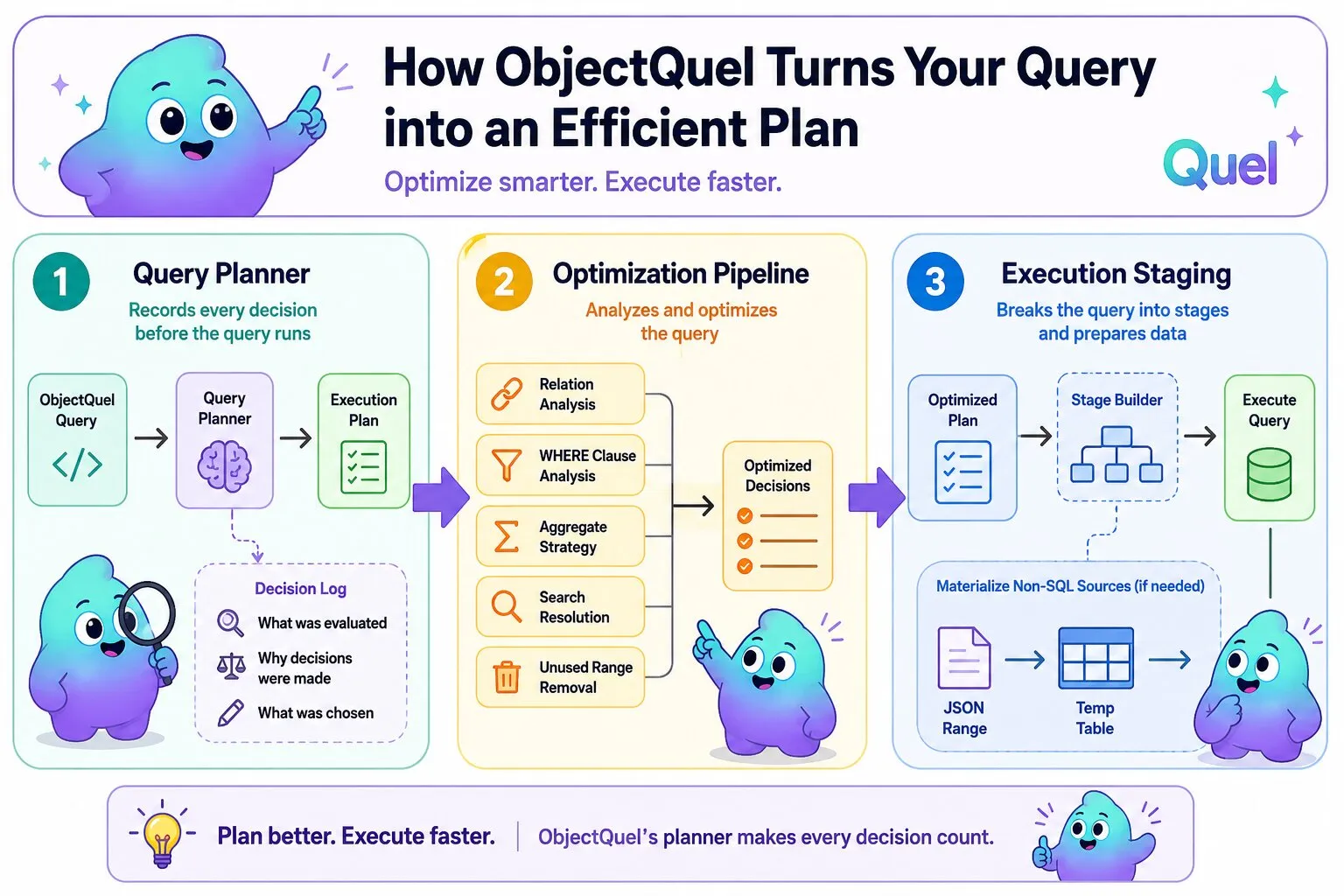
ObjectQuel includes a built-in query planner that records every optimization decision made before a query reaches the database. When development mode is enabled, the planner produces a log of what was evaluated and why — which joins were promoted or kept, which search strategy was chosen, how the query was decomposed into stages. This log is surfaced in the Canvas Inspector and is also available programmatically.
Enabling the Query Planner
The planner always runs — it is the component responsible for transforming an ObjectQuel query into an efficient execution plan. What development mode adds is logging: each decision is recorded and emitted as part of the debug signal that the Canvas Inspector consumes.
Pass a Configuration object with development mode enabled when setting up the entity manager:
$config = new Configuration();
$config->setDevelopmentMode(true);

$em = new EntityManager($connection, $config);config/database.php key and the full performance workflow including the slow query log, see Performance & Profiling.
Reading the Plan
In the Canvas Inspector, the Query Plan table appears below the ObjectQuel statement and generated SQL for each query. Each row is one decision, in the order the pipeline made it. The columns are:
- Source: Which part of the pipeline made the decision —
optimizerfor the transformation phase,plannerfor the execution stage builder. - Category: The broad type of decision —
join,aggregate,search, orstage. - Decision: A short label identifying the specific outcome.
- Reason: A plain-English explanation of why that decision was made.
- Subject: The range name, field, or aggregate the decision applies to.
Join Decisions
The optimizer analyzes each range in the query and determines the appropriate join type. It runs several passes — annotation-based promotion, WHERE clause analysis, and unused range removal — and records what it found at each step.
SINGLE_RANGE_INNER
When a query has only one range, it is automatically an INNER JOIN — there is nothing to join to. The optimizer records this immediately and skips further join analysis for that range:
range of p is App\Entity\PostEntity
retrieve (p) where p.published = true
optimizer join SINGLE_RANGE_INNER Range 'p' is the only range in the query; forced INNER JOIN planner stage SINGLE_STAGE Query executes in a single database stage
ANNOTATION_INNER
A @RequiredRelation annotation on a relationship declares that the related entity must always exist — the relationship is never optional. The optimizer promotes the range to INNER JOIN without inspecting the WHERE clause:
range of o is App\Entity\OrderEntity
range of u is App\Entity\UserEntity via o.user
retrieve (o, u.name)
optimizer join ANNOTATION_INNER Range 'u' has @RequiredRelation on 'user'; forced INNER JOIN
LEFT_TO_INNER
When a WHERE clause references a non-nullable field on a LEFT JOIN range, any row where that range produced no match would have a NULL in that field and would be filtered out anyway. The LEFT JOIN and INNER JOIN are semantically equivalent in this case, so the optimizer promotes to INNER JOIN, which is cheaper to execute:
range of u is App\Entity\UserEntity
range of o is App\Entity\OrderEntity via u.orders
retrieve (u) where o.total > 100
optimizer join LEFT_TO_INNER Range 'o' references a non-nullable field in WHERE; LEFT JOIN promoted to INNER JOIN
FORCED_LEFT
When the WHERE clause contains an is_null() or negated is_null() check on a range, the join must stay LEFT — converting to INNER would eliminate the rows the check is intended to find:
range of u is App\Entity\UserEntity
range of o is App\Entity\OrderEntity via u.orders
retrieve (u) where is_null(o.id)
optimizer join FORCED_LEFT Range 'o' has IS NULL / IS NOT NULL in WHERE; cannot promote to INNER JOIN
LEFT_UNCHANGED
When no condition warrants promotion or demotion, the range stays as a LEFT JOIN and the optimizer records why — either no WHERE references were found for that range, or the references it did find were on nullable fields:
range of u is App\Entity\UserEntity
range of o is App\Entity\OrderEntity via u.orders
retrieve (u, o.total)
optimizer join LEFT_UNCHANGED Range 'o' has no WHERE references; kept as LEFT JOIN
UNUSED_JOIN_REMOVED
When a range is joined but never referenced in the SELECT, WHERE, or ORDER BY clauses, it has no effect on the result and is removed entirely:
range of u is App\Entity\UserEntity
range of o is App\Entity\OrderEntity via u.orders
retrieve (u)
optimizer join UNUSED_JOIN_REMOVED Range 'o' is not referenced in SELECT, WHERE, or ORDER BY; removed
EXISTS_TO_INNER
An exists() check in the WHERE clause is rewritten as an INNER JOIN, which is more efficient than a correlated subquery in most cases:
range of u is App\Entity\UserEntity
range of o is App\Entity\OrderEntity via u.orders
retrieve (u) where exists(o)
optimizer join EXISTS_TO_INNER Range 'o' used in EXISTS; converted to INNER JOIN
Aggregate Decisions
The optimizer chooses a strategy for each aggregate function independently, based on what else appears in the SELECT clause and whether the query spans multiple ranges.
DIRECT
The aggregate is evaluated inline. When non-aggregate fields also appear in the SELECT, a GROUP BY is added automatically:
range of o is App\Entity\OrderEntity
retrieve (o.userId, count(o.id))
optimizer aggregate DIRECT Aggregate COUNT evaluated inline with GROUP BY
SUBQUERY
The aggregate is rewritten as a correlated subquery. This happens when the aggregate cannot be expressed directly alongside the other SELECT items — for example, when the aggregated range is different from the primary range:
range of u is App\Entity\UserEntity
range of o is App\Entity\OrderEntity via u.orders
retrieve (u, count(o.id))
optimizer aggregate SUBQUERY Aggregate COUNT rewritten as correlated subquery
WINDOW
The aggregate is rewritten as a window function, which computes the result across a partition without collapsing rows. This strategy applies when the query is single-range and all SELECT items are uniform in their aggregate usage:
optimizer aggregate WINDOW Aggregate COUNT rewritten as window function
Search Decisions
The search() function resolves to either a FULLTEXT index query or a LIKE pattern match, depending on whether a suitable index exists.
FULLTEXT
A FULLTEXT index covering all the searched columns was found. The query uses MATCH ... AGAINST:
range of p is App\Entity\PostEntity
retrieve (p) where search(p.title, p.body) = :term
optimizer search FULLTEXT search() on [title, body] resolved to FULLTEXT INDEX (covering index found)
LIKE
No covering FULLTEXT index was found. The query falls back to a LIKE pattern match on each column:
optimizer search LIKE search() on [title, body] resolved to LIKE (no covering FULLTEXT index found)
Stage Decisions
After optimization, the planner decomposes the query into execution stages. Most queries run in a single stage. Queries that reference non-SQL sources — such as JSON ranges — require those sources to be materialized into temp tables before the main query can run.
SINGLE_STAGE
The query runs as a single database operation with no intermediate materialization:
planner stage SINGLE_STAGE Query executes in a single database stage; no temp table materialization required
TEMP_TABLE and EXECUTION_ORDER
When a range cannot be expressed as inline SQL, it is materialized into a temp table first. The planner records each temp table stage and then the execution order — which stages must complete before the main query can run:
planner  stage  TEMP_TABLE        Range 'jsonSrc' requires temp table materialization (contains external/JSON source)
planner  stage  EXECUTION_ORDER   Stage execution order: tmp_stage_abc -> main
Programmatic Access
To inspect a query plan directly — in a test, a CLI command, or a custom diagnostic tool — call explainQuery() on the entity manager. It runs the full planning pipeline and a SQL dry-run without executing the query against the database:
$plan = $em->explainQuery("
    range of u is App\Entity\UserEntity
    range of o is App\Entity\OrderEntity via u.orders
    retrieve (u) where o.total > 100
");

foreach ($plan->getNotes() as $note) {
    echo "[{$note->category}] {$note->decision}: {$note->reason}\n";
}

foreach ($plan->getSql() as $sql) {
    echo $sql . "\n";
}
explainQuery() is available regardless of whether development mode is enabled. QueryPlan implements JsonSerializable, so it can be passed directly to json_encode().