 ️
️ Schema Management (Sculpt CLI)
Sculpt is ObjectQuel's command-line tool for database schema management. It generates entities, creates and applies migrations, and keeps your database schema in sync with your entity definitions.
Creating Entities
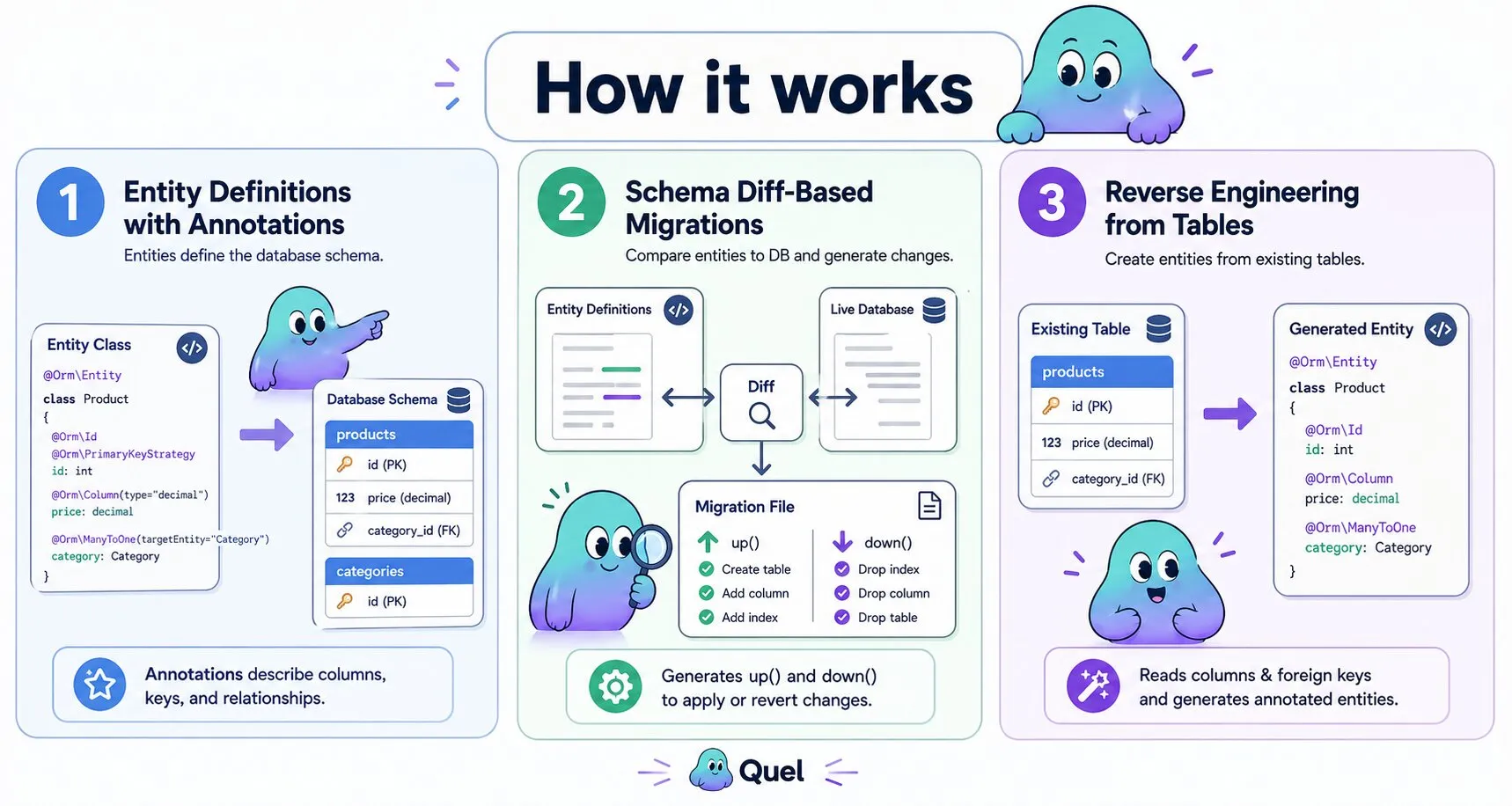
The make:entity command walks you through creating a new entity interactively. It prompts for a class name, table name, properties (with type, length, and nullability), and relationships. When finished it writes the entity file with all annotations in place.
$ php bin/sculpt make:entity

 Entity name: > Product
 Table name [products]: > products

 Property name: > price
 Property type [string]: > decimal
 Property precision [10,2]: > 10,2
 Can this property be null? [no]: > no

 Property name: >

 Relationship type (InverseOf, ManyToOne, OneToOne, or <return> to skip): > ManyToOne
 Related entity: > Category

 Success! Created: src/Entity/ProductEntity.php
The generated entity contains @Orm\Column annotations for each property, a primary key with @Orm\PrimaryKeyStrategy, and relationship annotations with the correct targetEntity and inversedBy values. Getters and setters are included for all properties.
When the generate_foreign_keys config option is enabled, creating an owning-side relationship (ManyToOne or OneToOne) also attaches a real @Orm\ForeignKey constraint to the generated foreign key column automatically — see Foreign Key Constraints.
Reverse Engineering
make:entity-from-table generates an entity from an existing database table. Sculpt reads the table's columns, types, and foreign keys, then produces a fully annotated entity. Foreign key columns become relationship properties; inverse sides are detected automatically from other tables that reference this one.
$ php bin/sculpt make:entity-from-table

 Available tables: categories, products, users, orders, order_items

 Select table: > products
 Entity name [ProductEntity]: > ProductEntity
 Namespace [App\Entity]: > App\Entity
 Generate relationships? [yes]: > yes

 Success! Created: src/Entity/ProductEntity.php
 Detected: ManyToOne category_id -> CategoryEntity
 Detected: InverseOf referenced by OrderItemEntity.product_id
This is the fastest way to bring ObjectQuel into an existing project. Run the command once per table, then adjust any annotations the wizard could not infer automatically.
With generate_foreign_keys enabled, this command also detects real FOREIGN KEY constraints already present in the table and emits matching @Orm\ForeignKey / @Orm\ForeignKeyAction annotations — see Foreign Key Constraints for details and the config option.
Migrations
make:migrations diffs your entity annotations against the live database schema and generates a migration file covering every detected change — new tables, altered columns, added or removed indexes, dropped columns, primary key changes, and added, modified, or removed foreign key constraints declared with @Orm\ForeignKey (see Foreign Key Constraints).
$ php bin/sculpt make:migrations

 Changes detected:
 ✓ New table: products
 ✓ New index: products.idx_category_id
 ✓ Modified column: users.email (added unique constraint)
 ✓ Dropped column: orders.legacy_status

 Success! Created: database/migrations/20250603145623_EntitySchemaMigration.php
The generated file contains both up() and down() methods. Review it before applying — particularly column drops, which cannot be recovered from without a backup.
JSON column types
Columns declared as type="json" in an entity annotation are translated to the correct DDL type for the connected database engine automatically. No annotation change is needed when deploying to a different engine:
| Engine | Generated DDL type |
|---|---|
| MySQL / MariaDB | json |
| PostgreSQL | jsonb |
| SQLite | json |
Schema comparison is also engine-aware: PostgreSQL's jsonb is normalized to json before diffing, so existing JSON columns never appear as modified on subsequent make:migrations runs.
Backfilling non-nullable columns
Adding a required column to a table that already has rows needs a value for those existing rows. When make:migrations detects a new non-nullable column on a table with data, it looks for that column's @Orm\Column(default=...) and writes a backfill clause into the generated migration automatically (see Backfilling Added Columns):
public function up(): void {
    $this->query("alter orders (add status = string(20) backfill 'pending')");
}
If the entity declares no default, generation fails rather than silently guessing a value:
Cannot add non-nullable column 'orders.status': the table has existing rows and the entity
declares no default to backfill them with. Add @Orm\Column(default=...) to the entity, or
write this migration by hand with make:blank-migration.
Hand-written migrations
make:blank-migration (renamed from make:migration) scaffolds an empty migration for changes that aren't a plain entity diff — a data backfill, a value transformation, or a schema change make:migrations can't express, such as a column rename:
$ php bin/sculpt make:blank-migration BackfillOrderStatus

 Success! Created: database/migrations/20250603145623_BackfillOrderStatus.php
Every migration, generated or hand-written, is a plain PHP class with up()/down(), each running ObjectQuel DDL/write-verb statements through $this->query():
final class BackfillOrderStatus extends AbstractMigration {
    public function up(): void {
        $this->query("alter orders (add status = string(20) backfill 'pending')");
    }

    public function down(): void {
        $this->query("alter orders (drop status)");
    }
}
Applying migrations
# Preview what would run without touching the database
$ php bin/sculpt quel:migrate --dry-run

# Apply all pending migrations
$ php bin/sculpt quel:migrate

# Check which migrations have run
$ php bin/sculpt quel:migrate --status
Rolling back
# Rollback the last migration
$ php bin/sculpt quel:migrate --rollback

# Rollback multiple steps
$ php bin/sculpt quel:migrate --rollback --steps=3
Always take a database backup before applying migrations in production. --rollback executes the down() method of the migration, but if the down() method drops a table, rolling back does not recover the data.
Analysing Indexes
quel:analyze-indexes scans every table and reports redundant indexes — duplicates and indexes already covered by a wider composite index. Primary key indexes are never flagged.
$ php bin/sculpt quel:analyze-indexes| Status | Meaning |
|---|---|
ok |
Index is not redundant. |
Duplicate of <index> |
Covers the exact same columns in the same order as another index. Safe to drop. |
Prefix of <index> (<columns>) |
Covered by a wider index whose leading columns are identical. |
On MySQL and MariaDB, Reads and Writes columns are appended from performance_schema.table_io_waits_summary_by_index_usage when performance_schema is enabled. A redundant index with zero reads is a confident removal candidate.
Index Visibility
quel:index-hide marks an index invisible to the optimizer without dropping it (INVISIBLE on MySQL ≥ 8.0, IGNORED on MariaDB). quel:index-show restores it instantly. Both commands accept an entity name; omitting arguments triggers interactive prompts.
$ php bin/sculpt quel:index-hide OrderLine idx_created_at
$ php bin/sculpt quel:index-show OrderLine idx_created_at
For the full analysis and safe-removal workflow, see Performance & Profiling.
Listing EQUEL Functions
quel:list-functions lists every EQUEL function deployed to the connected database's default schema, with its parameters and return type. Both are shown as ObjectQuel's abstract column types rather than the engine-native ones, and the return type may be void — mirroring EQUEL's own define function name(...) returnType { ... } syntax.
$ php bin/sculpt quel:list-functions

+----------------+------------------------+-------------+
| Name           | Parameters             | Return Type |
+----------------+------------------------+-------------+
| activate_user  | integer id             | void        |
| order_total    | integer order_id       | decimal     |
+----------------+------------------------+-------------+

2 functions found.
EQUEL only has one kind of routine, a function — the function/procedure split some engines use internally isn't exposed here. A name can appear twice if the database has it as both a value-returning and a void function, since MySQL and MariaDB keep those in separate namespaces.
Supported on MySQL, MariaDB, PostgreSQL, and SQL Server. SQLite has no stored functions and is reported as an error.
Clearing the Annotation Cache
ObjectQuel caches parsed entity annotations in /storage/annotations to avoid re-reading and re-parsing entity files on every request. quel:clear-cache deletes all files in that directory, forcing a clean rebuild on the next request.
$ php bin/sculpt quel:clear-cache

 Cache cleared.
Run this command after modifying entity annotations manually. Changes to annotations are not picked up until the cache is cleared.