 ️
️ Searching
ObjectQuel provides three approaches for matching and searching text: wildcard patterns, regular expressions, and full-text search. All three are used within where clauses and can be combined with other filter conditions.
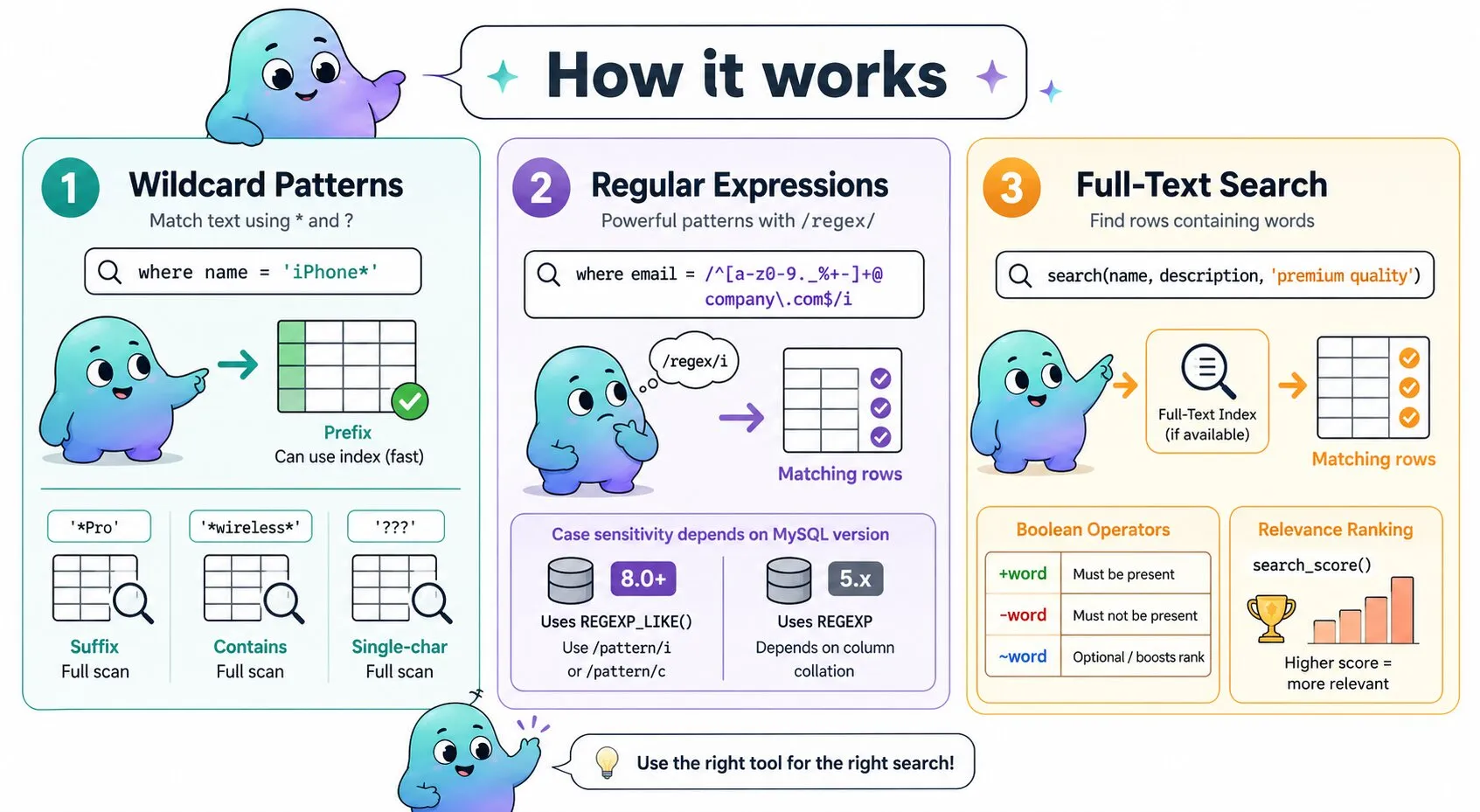
Wildcard Patterns
Place the pattern in single quotes and use the = operator — ObjectQuel detects the wildcard characters and converts the comparison into a pattern match automatically. Two wildcard characters are available:
*— matches any number of characters (including zero)?— matches exactly one character
// Prefix: can use an index — fast
$results = $entityManager->executeQuery("
    range of p is App\\Entity\\ProductEntity
    retrieve (p) where p.name = 'iPhone*'
");

// Suffix: full table scan
$results = $entityManager->executeQuery("
    range of p is App\\Entity\\ProductEntity
    retrieve (p) where p.name = '*Pro'
");

// Contains: full table scan
$results = $entityManager->executeQuery("
    range of p is App\\Entity\\ProductEntity
    retrieve (p) where p.name = '*wireless*'
");

// Single-character wildcard: match exactly 3 characters
$results = $entityManager->executeQuery("
    range of p is App\\Entity\\ProductEntity
    retrieve (p) where p.code = '???'
");

// Mixed: prefix portion may use an index
$results = $entityManager->executeQuery("
    range of p is App\\Entity\\ProductEntity
    retrieve (p) where p.sku = 'ABC*-???-*XYZ'
");

// Negation: find rows that do not match a pattern
$results = $entityManager->executeQuery("
    range of p is App\\Entity\\ProductEntity
    retrieve (p) where p.name != 'Test*'
");
Wildcard Performance
| Pattern | Example | Index usage |
|---|---|---|
| Prefix | 'iPhone*' |
Can use index — fast |
| Suffix | '*Pro' |
Full scan |
| Contains | '*wireless*' |
Full scan |
| Single-char | '???' |
Full scan |
| Mixed | 'ABC*-???-*XYZ' |
Prefix portion may use index |
Regular Expressions
When wildcards aren't expressive enough, ObjectQuel supports regular expressions using MySQL regex syntax. Enclose the pattern in forward slashes instead of quotes:
// Match company email addresses
$results = $entityManager->executeQuery("
    range of u is App\\Entity\\UserEntity
    retrieve (u) where u.email = /^[a-zA-Z0-9._%+-]+@company\.com$/
");
Case Sensitivity
Case sensitivity behaviour depends on the MySQL version ObjectQuel detects at runtime:
- MySQL 8.0+ — ObjectQuel uses
REGEXP_LIKE(), which supports inline flags after the closing slash. Appendifor case-insensitive matching (/pattern/i) orcto force case-sensitive matching regardless of the column's collation (/pattern/c). - MySQL 5.x — ObjectQuel falls back to the
REGEXPoperator, which does not support inline flags. Case sensitivity is determined by the column's collation:utf8mb4_unicode_cimatches case-insensitively; binary or case-sensitive collations match case-sensitively.
// Case-insensitive (MySQL 8.0+)
$results = $entityManager->executeQuery("
    range of u is App\\Entity\\UserEntity
    retrieve (u) where u.email = /^[a-z0-9._%+-]+@company\.com$/i
");

// Case-sensitive regardless of column collation (MySQL 8.0+)
$results = $entityManager->executeQuery("
    range of p is App\\Entity\\ProductEntity
    retrieve (p) where p.code = /^[A-Z]{3}-[0-9]+$/c
");
Full-Text Search
For natural language queries — finding rows that contain certain words regardless of position — use the search() function. When a full-text index is available on the searched columns, ObjectQuel uses it for fast results. Without one, it falls back to a series of LIKE statements that return the same results but scan the entire table.
Single-Field Search
$results = $entityManager->executeQuery("
    range of p is App\\Entity\\ProductEntity
    retrieve (p) where search(p.description, 'bluetooth speaker')
");
Multi-Field Search
Pass multiple fields to search across several columns at once:
$results = $entityManager->executeQuery("
    range of p is App\\Entity\\ProductEntity
    retrieve (p) where search(p.name, p.description, 'premium quality')
");
Boolean Operators
Control which terms are required, excluded, or optional using boolean prefixes in the search string:
| Operator | Meaning | Example |
|---|---|---|
+word |
Must be present | +bluetooth |
-word |
Must not be present | -expensive |
word |
Optional — boosts ranking if present | wireless |
$results = $entityManager->executeQuery("
    range of p is App\\Entity\\ProductEntity
    retrieve (p) where search(p.description, 'wireless +bluetooth -expensive')
");
Combining Search with Other Filters
search() is a regular where-clause condition and can be combined with any other filter:
$results = $entityManager->executeQuery("
    range of p is App\\Entity\\ProductEntity
    range of c is App\\Entity\\CategoryEntity via p.category
    retrieve (p, c.name)
    where search(p.name, p.description, '+wireless +bluetooth')
      and p.price >= :min and p.price <= :max
      and c.name = 'Electronics'
    sort by p.price asc
", [
    'min' => 25.00,
    'max' => 200.00
]);
Searching Across Related Entities
search() can target fields on related entities, just like any other where-clause condition:
$results = $entityManager->executeQuery("
    range of o is App\\Entity\\OrderEntity
    range of i is App\\Entity\\OrderItemEntity via o.items
    range of p is App\\Entity\\ProductEntity via i.product
    retrieve (o, p.name)
    where search(p.description, '+organic')
      and o.status = 'completed'
");search() falls back to LIKE statements and requires a full table scan.
Relevance Scoring with search_score()
search_score() returns the numeric relevance score for a full-text match. It takes the same field list and search term as search(), but produces a numeric value rather than a boolean — so it belongs in the retrieve clause or a sort by clause, not a where clause. The typical pattern is to filter with search() and rank with search_score():
$results = $entityManager->executeQuery("
    range of p is App\\Entity\\ProductEntity
    retrieve (p, score=search_score(p.name, p.description, :term))
    where search(p.name, p.description, :term)
    sort by score desc
", ['term' => 'bluetooth speaker']);
You can also expose the score as a column without sorting by it:
$results = $entityManager->executeQuery("
    range of p is App\\Entity\\ProductEntity
    retrieve (p.name, p.price, score=search_score(p.name, p.description, :term))
    where search(p.name, p.description, :term)
    sort by p.price asc
", ['term' => 'wireless']);

foreach ($results as $row) {
    echo $row['p.name'] . ' (score: ' . $row['score'] . ')';
}search() and search_score(). Both calls must reference the same columns. Without a full-text index on those columns, search_score() returns 0 for all rows.